Who can delegate
Choose, per identity provider, the people and services the agent can act for, record consent and set the expiration.
The first question of every call is whether the subject delegated to the agent. The Who can delegate column answers it. Without delegation, the agent does not even get a token: the token exchange fails with no_delegation, and so does the call (Delegation).
Delegation is configured per identity provider. Each provider connected to the environment can appear once in the column, with its checked subjects.
Manage identity providers
Manage identity providers, in the section bar, shows how many providers the agent has. With one, it opens that provider's panel. With none or several, it opens the list: how many subjects delegate and from how many providers, then one row per provider with its kinds and its delegations ("People · Delegations: 2 of 7"). Each row opens the panel of that provider, with Back to the list. Add identity provider adds an enabled provider that is not in the list yet; when every enabled provider is already there, the list says to connect another in Identity providers.
The provider panel
Clicking a provider in the graph selects the provider → agent link and opens the panel:
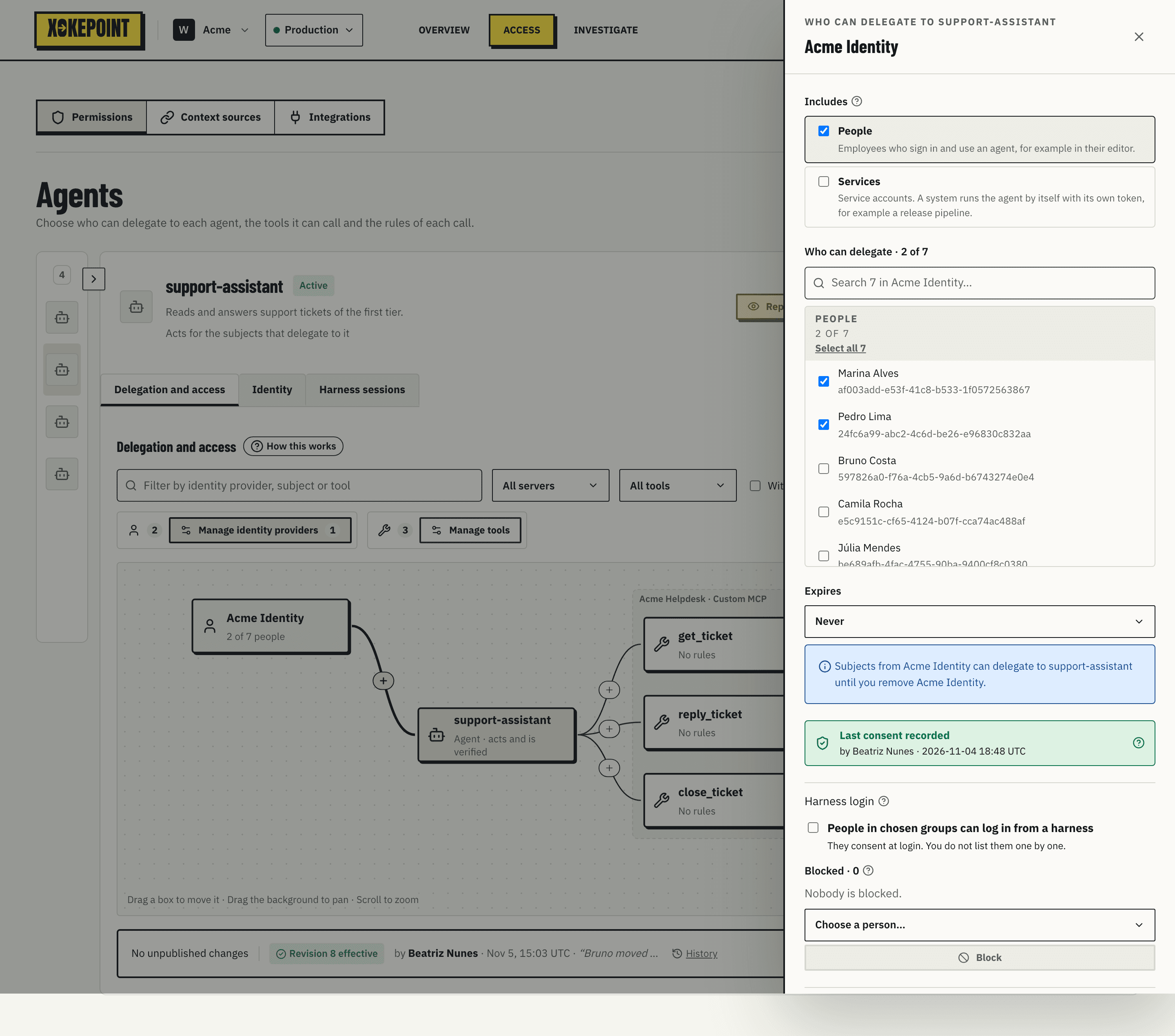
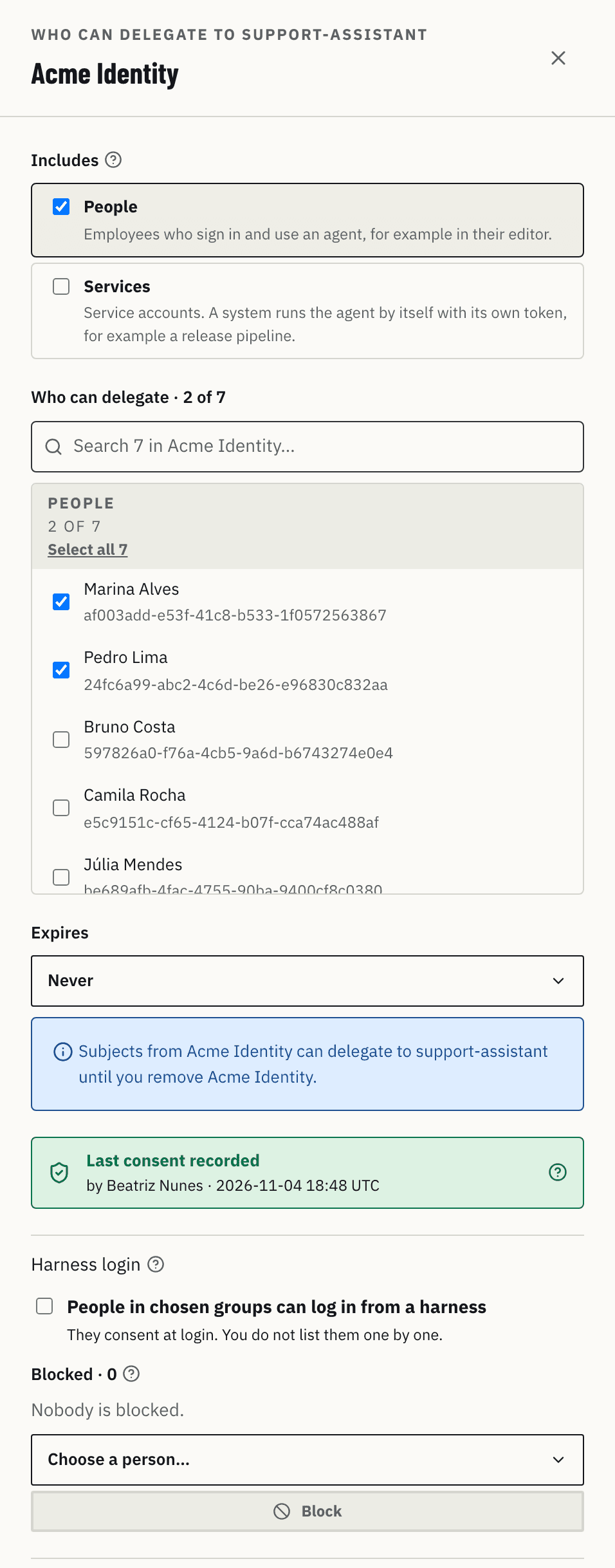
Includes says which kinds of subject the provider offers to this agent:
- People: people who sign in to the IdP and use the agent, for example in their editor.
- Services: service accounts. A system runs the agent by itself, with its own token, such as a release pipeline.
Who can delegate · N of M is the directory list, with a People section and a Services section. Each section shows "N of M" and has Select all N or Clear. Search looks across all subjects of the provider; checked ones come first, and Show more loads more in steps.
Expires is Never or On a date; choosing a date opens the calendar. It sets whether this provider's delegation ends on that day. It is a condition of the relation in OpenFGA: after the date, no subject of the provider delegates to the agent, without anyone unchecking them.
Last consent recorded shows who recorded the consent and when. The help icon explains where it comes from.
Remove {provider} removes the provider and all of its delegations from the draft.
Select all is not "everyone"
There is no "everyone, including future users" mode. Select all checks each subject the directory lists now, and publication stores one delegation for each. Someone created in the IdP later is not included automatically: the administrator checks them and publishes again. The choice is deliberate: a delegation always points to a subject someone saw in the list.
Consent
Delegation says the person authorized the agent, so that consent has to be on record.
It comes from one of two sources:
- The administrator, for the subjects checked in the list. Consent is recorded once for each identity provider in the agent, not per person: the Admin records who confirmed it and when, from the signed-in administrator, and a provider without consent cannot be published.
- The person, at login from a coding harness (Harness login). Each person accepts on the consent page, and the record keeps the person, the group that made them eligible and the expiry.
Some IdPs can prove the delegation themselves (Entra On-Behalf-Of, Okta Cross App Access, the act claim in Keycloak). Xokepoint does not accept those proofs yet, so a listed subject needs the consent in the Admin for every provider, Keycloak and Google Workspace included.
Harness login
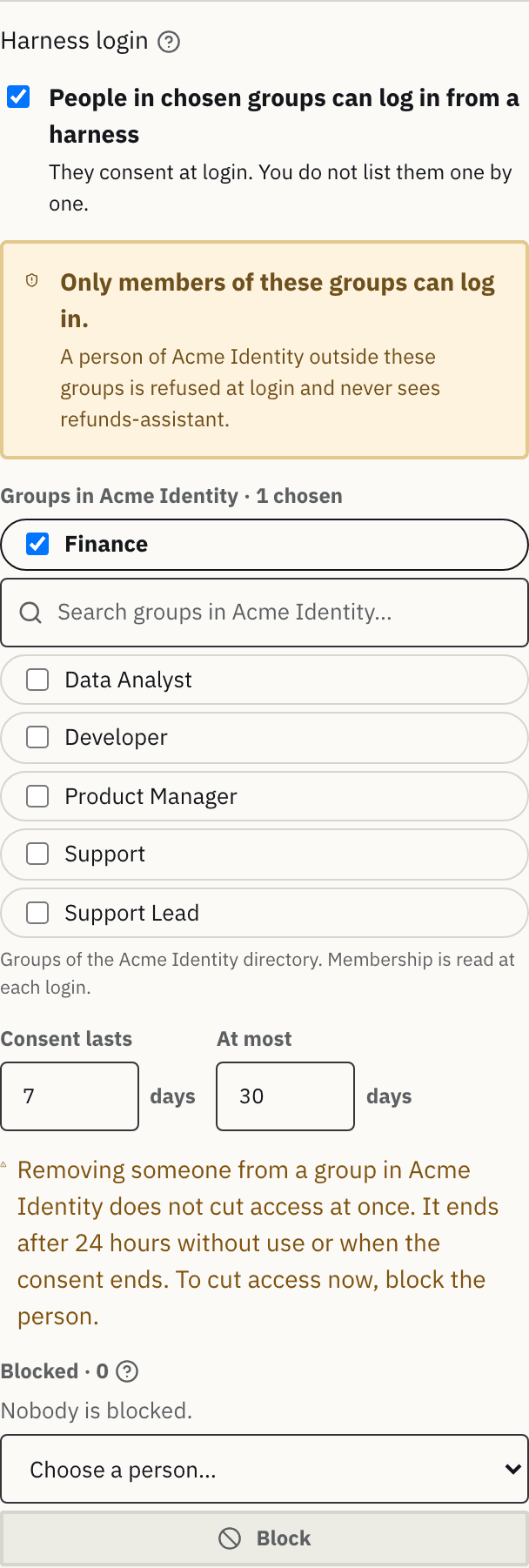
The Harness login block sits in the provider panel, below the consent record. People of this identity provider log in from a coding harness and consent themselves; the administrator chooses which groups can. The agent still decides what they can do: servers, tools and rules are the same for everyone.
- When the provider does not include People, the block only says "Include People above to let people log in from a harness."
- The switch People in chosen groups can log in from a harness turns it on: "They consent at login. You do not list them one by one."
- The rule box under the switch states the rule: Only members of these groups can log in. A person of the provider outside the groups is refused at login and never sees the agent. Without a group, the box says "Choose at least one group. Without a group, harness login stays off." and the draft cannot be published.
- Groups are chips of the directory groups of the provider, with search. For Keycloak, the chip shows the group path on hover. A chosen group that no longer exists in the directory stays visible, marked "Not found in {provider}". Groups match by their ID in the provider: a renamed group keeps its access, a group deleted and created again does not.
- Consent lasts {n} days and At most {m} days: the default validity of a consent and the maximum. The first is at most the second, and a consent never lasts longer than the expiration of the provider.
- A warning is always shown when the switch is on: "Removing someone from a group in {provider} does not cut access at once. It ends after 24 hours without use or when the consent ends. To cut access now, block the person."
Membership is read from the directory of the provider at each login (Connect an identity provider). Keycloak membership through a parent group is not inherited, and Microsoft Entra ID and Google Workspace nested groups are not followed: the person must be a direct member of a chosen group. In Okta, the Everyone group, which holds every person of the org, can not be chosen.
Blocked
Blocked · N lists the people vetoed on the agent, with name, subject, reason and Unblock. Choose a person from the directory and Block. A blocked person cannot use the agent, whatever their groups or consent. Blocking does not need the switch to be on, and it also removes the person's delegation from the draft.
A block is part of the draft and the revision history. When you publish it, the consents and machines of that person on the agent are revoked at once, and they cannot log in to it again. Block in Harness sessions adds the person to this list.
Turning harness login off, removing People from the provider or removing the provider revokes the consents of that provider when you publish. Removing a group revokes the consents that were accepted only through that group.
Add a provider
Add identity provider, in the list of identity providers, shows the add form:
- Identity provider: the connected providers not yet in the agent.
- Includes: people, services or both.
- Who can delegate: check the subjects.
- Expires: never, or on a date.
- The confirmation box: "I confirm that these subjects agreed to let {agent} act for them". It records the consent with the administrator's name and the time.
- Add N to draft is available only with at least one subject checked and the confirmation given.
Before publication, the provider confirms each subject. A user removed from the directory does not become a delegation.
A single person's delegation
An individual delegation has its own panel, opened from the provider list or the group panel: subject and kind, consent, expiration and Remove delegation. A delegation never has rules on call data: Rule on call data is disabled with the reason "Who can delegate has no rules. Add the rule to a tool of the agent."