Google Workspace
The Google Workspace connection form, accepted client IDs, the domain, the service account with domain-wide delegation and administrator consent.
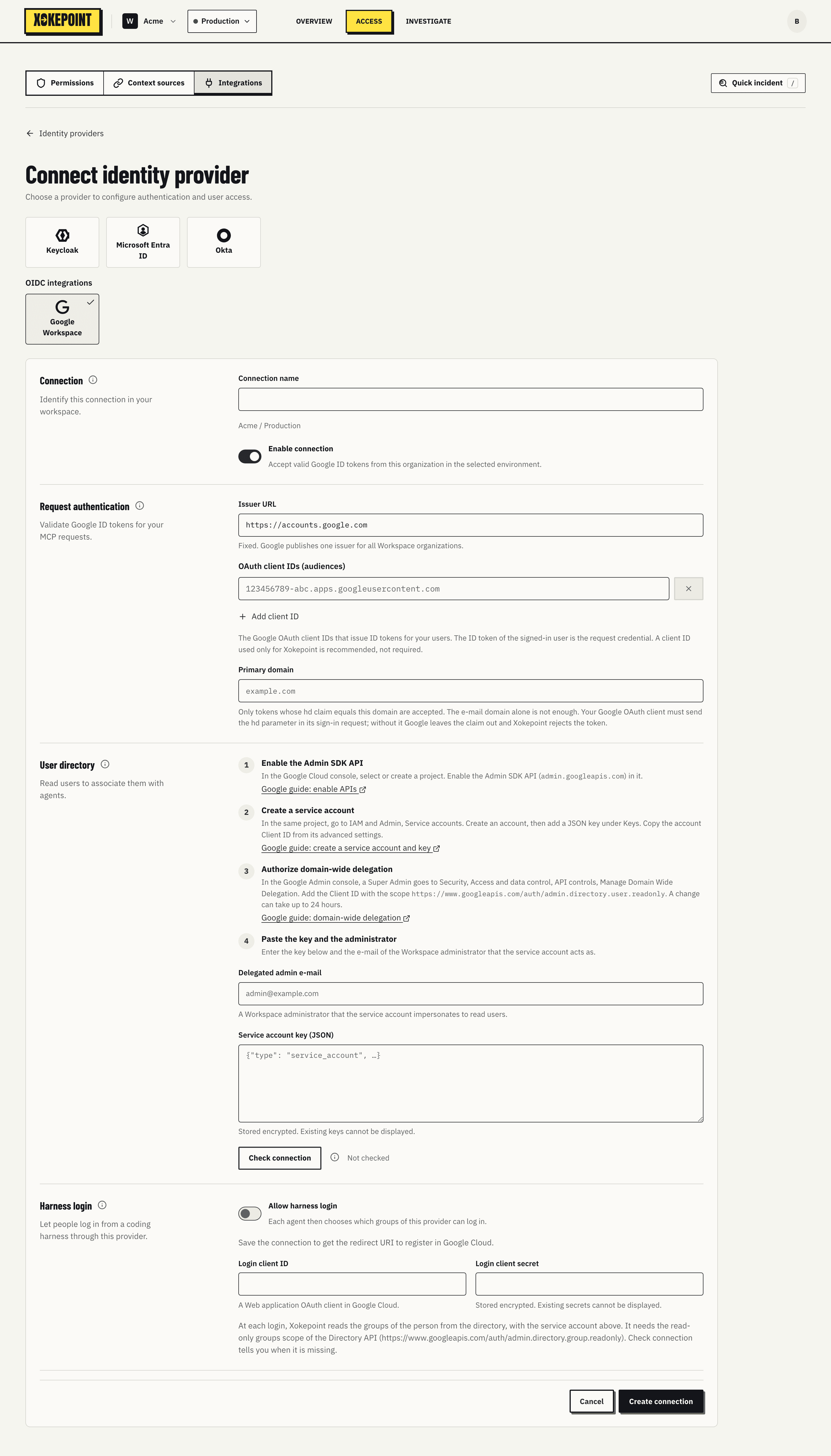
Connection
- Connection name and Enable connection, as in other connections.
Request authentication
- Issuer URL: fixed,
https://accounts.google.com. Google publishes a single issuer for all Workspace organizations. - OAuth client IDs (audiences): the Google OAuth client IDs that issue tokens for users. The signed-in user's ID token is the credential, and the client ID is its audience. Add client ID adds another one.
- Primary domain: only tokens whose
hdclaim equals this domain are accepted. The e-mail domain alone is not enough: the OAuth client must send thehdparameter at sign-in, and Xokepoint refuses a token without the claim.
User directory
The Admin reads the directory through the Admin SDK Directory API. The form guides you through four steps, each with a link to the Google guide:
- Enable the Admin SDK API in the Google Cloud project.
- Create a service account and a JSON key for it.
- Authorize domain-wide delegation in Google Admin, with the service account Client ID and the directory user read scope.
- Paste the key and the administrator: the key in Service account key (JSON) and the e-mail of a Workspace administrator in Delegated admin e-mail. The service account reads the directory as that administrator.
The key is stored encrypted and cannot be displayed again. Check connection verifies everything before saving.
Harness login
The last section configures how people log in from a coding harness with their Google account (Harness login):
- Allow harness login turns it on for the connection.
- Redirect URI: add it to the authorized redirect URIs of the login client in Google Cloud.
- Login client ID and Login client secret: a Web application OAuth client in Google Cloud.
Google ID tokens carry no groups. To read the groups of a person at login, add the read-only groups scope of the Directory API, https://www.googleapis.com/auth/admin.directory.group.readonly, to the domain-wide delegation of the service account. Nested groups are not followed: the person must be a direct member of a chosen group.
Delegation without provider support
Google Workspace has no delegation of its own for agents. So, when choosing who can delegate to an agent, the administrator records the consent in the Admin, with their name and the time, or each person consents at harness login (Who can delegate).
Google service accounts can also be subjects and appear as Services in delegation.