Connect a coding harness
Add the MCP URL of a server to Claude Code or Codex, sign in with the company identity provider and consent.
A coding harness, such as Claude Code or Codex, connects to Xokepoint without a key file. The developer adds one URL, signs in with the company identity provider in the browser and allows the agent. The harness then calls the tools that the agent allows, with a person present behind each call.
This page is the interactive mode. For an agent that runs as a service with its own key, see Integrate the agent.
What you need
-
The MCP URL of each server, from the administrator. The Harness login card of the agent shows one URL for each server (Agent identity):
<origin>/api/v1/mcp/<workspace>/<environment>/<server_id> -
An account in the company identity provider, in a group that the administrator allowed for the agent (Who can delegate).
-
A harness that the administrator allowed for the agent. Claude Code and Codex are in the catalog. Another harness works when its vendor publishes a client metadata document and the administrator adds its URL.
Add the URL to the harness
Claude Code:
claude mcp add --transport http acme-issues <MCP URL>Then run /mcp in Claude Code and choose the server to sign in.
Codex:
codex mcp add acme-issues --url <MCP URL>
codex mcp login acme-issues
The login opens the browser.
Add one entry for each server. The token is for the MCP ingress of the environment, not for one server, so it is valid for every server of the agent. The harness can still ask you to sign in once for each entry; each login is its own machine.
What the harness does
The harness follows the MCP authorization specification. Nothing in it is specific to Xokepoint:
- Discovery. Every 401 of the ingress carries
WWW-Authenticatewith aBearerand aDPoPchallenge, each withresource_metadata, the URL of the protected resource metadata (RFC 9728). TheDPoPchallenge lists the accepted proof algorithms inalgs(Token validation). A harness that starts its login without a request, such asclaude mcp login, builds the same URL from the MCP URL. It names the authorization server of the environment, whose metadata (RFC 8414) lists the authorization endpoint, the grants andclient_id_metadata_document_supported. - Client identity. The harness sends as
client_idthe HTTPS URL of its Client ID Metadata Document (CIMD): a public file of the vendor with the harness name and its redirect URIs. Xokepoint accepts only the URLs that the administrator allowed for an agent. There is no dynamic client registration. - Authorization request. Authorization code with PKCE S256 (RFC 7636), a loopback redirect URI (
http://127.0.0.1,http://[::1]orhttp://localhost, any port, RFC 8252) listed in the CIMD document, andresourceequal to the MCP ingress of the environment (RFC 8707). An unknownclient_idor an invalid redirect URI stops on an error page, before any sign-in. - Token. The harness redeems the code at the token endpoint with its
code_verifier. The code is valid for 60 seconds and is used once.
Sign in and consent
The browser opens pages served by the Xokepoint authorization server, with the Xokepoint mark and the workspace and environment names:
- Sign in to continue: only when more than one identity provider allows harness login. Choose yours.
- Sign-in at the company identity provider, as on any company app.
- Choose how {harness} works for you: only when you are eligible for more than one agent of this harness, for example "Claude Code — Developers" and "Claude Code — SRE". Each option shows its servers and the group that makes you eligible.
- Allow {agent} to act for you?: the harness, who you are signed in as and through which group, It will be able to use (servers, tools and resources), and the validity: "Valid for {n} days, until {date}." The consent is only for this computer, and your administrator can revoke it at any time. Allow or Deny.
- You are connected: return to the harness and close the tab.
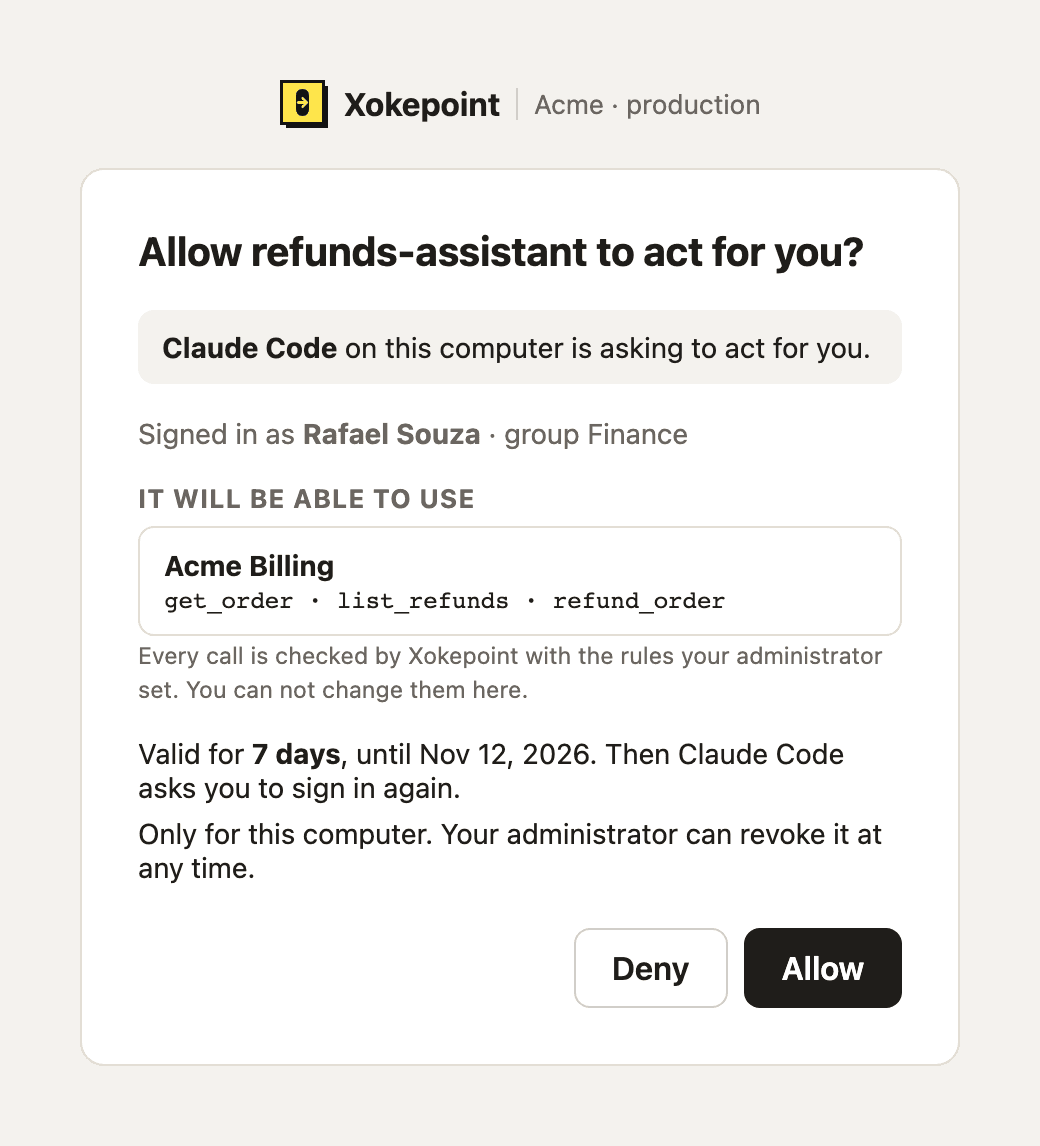
Every call is still checked by Xokepoint with the rules of the agent. The consent says that you let the agent act for you; it does not change what the agent can do.
When you are refused
| Page | Meaning | What to do |
|---|---|---|
| You can not use {harness} here | You are not in a group that the administrator allowed for any agent of this harness | Ask for access |
| Access to {harness} is blocked | The administrator blocked you on the agent | Contact the administrator |
| {harness} is not allowed here | The administrator did not allow this harness | Ask the administrator to allow it |
| Sign-in can not continue | The sign-in stopped for another reason. The page does not say which | Start again from the harness. If it happens again, send the code to your administrators |
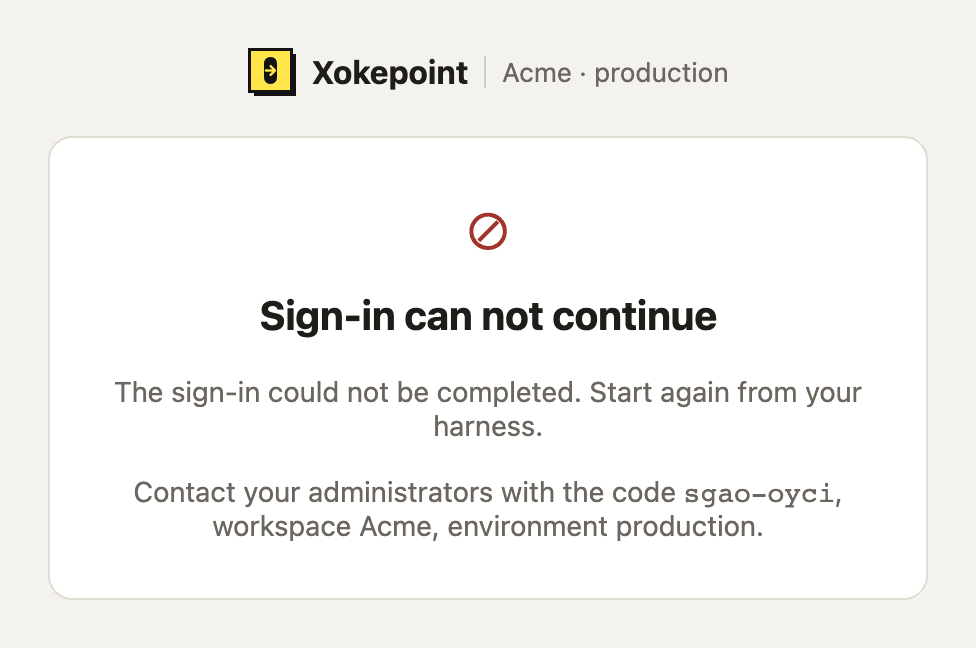
Every refused page ends with "Contact your administrators with the code {code}, workspace {workspace}, environment {environment}." Send the three. Your administrator opens that environment and pastes the code in Quick incident, which shows why the login was refused.
A tool call that Xokepoint denies shows a code too, in the error message of the harness: "Access denied. Reference {code}." Send it the same way.
Tokens and refresh
- The access token lasts 5 minutes, as in the headless mode. It carries
chokepoint_subject.presence: interactiveand thegrant_idof this machine (Token exchange). - The harness renews it with a refresh token. The refresh token rotates on each use, ends after 24 hours without use and never lasts longer than the consent. When it ends, the harness asks you to sign in again.
- A refresh token or code used twice revokes the machine at once. A stolen token that is reused stops working for both copies, and the reuse appears in Investigate as
refresh_reuseorcode_reuse. - Each login is one machine. The administrator sees it in Harness sessions and can revoke it alone.
DPoP (optional)
When the harness sends a DPoP proof (RFC 9449) with the code redemption, the token is bound to its key (cnf.jkt). The harness must then call with Authorization: DPoP and a fresh proof on every request and every refresh; a copied token without the key is refused with 401 invalid_dpop_proof at the ingress (Token validation). At the token endpoint, a code redemption or a refresh with an invalid proof, or a bound refresh without one, is recorded as dpop_invalid. A harness without DPoP gets a bearer token. A call condition can require a bound token with context.chokepoint.binding == "dpop" (Conditions).